
What Is a Nassau County Court Docket
A docket is a list. It shows every event in a case in date order. Each line marks one filing, one motion, one order, or one appearance. The docket does not hold the full text of those papers. It is the index to them. A reader uses the docket to see what has happened and what comes next. The full case file holds the actual documents behind each docket line.
Nassau dockets split by court. Civil Supreme Court and County Court civil dockets sit in the state WebCivil Supreme system and are tied to index numbers. Electronically filed dockets, with links to the papers themselves, live in NYSCEF. Criminal dockets with a future court date show through WebCriminal. District Court civil, small claims, and landlord-tenant dockets run through WebCivil Local. Each system shows the case calendar a little differently, but the core idea holds: the docket tracks the case, and the file holds the proof.
How to Find Nassau County Dockets Online
The main free tool for Supreme and County Court civil dockets is WebCivil Supreme. It returns past, present, and future case information for every New York Civil Supreme Court, with Nassau in the court dropdown. For e-filed matters, the NYSCEF guest case search lets a user pull a docket and open public documents without a login. For criminal cases with an upcoming date, use WebCriminal.
- Open NYSCEF guest search or WebCivil Supreme, depending on whether the case was e-filed.
- Pick the court. Select Nassau Supreme or Nassau County Court for civil dockets, or the right Nassau criminal court in WebCriminal.
- Enter the index number, case number, or party name. Index search is fastest when the number is known.
- Open the case to view the docket. Read each entry in date order and note the next appearance.
- Save or print the docket page. Certified copies of the underlying papers still come from a clerk.
The image below opens the NYSCEF guest case search form, where a user starts a Nassau docket lookup by case number or county.
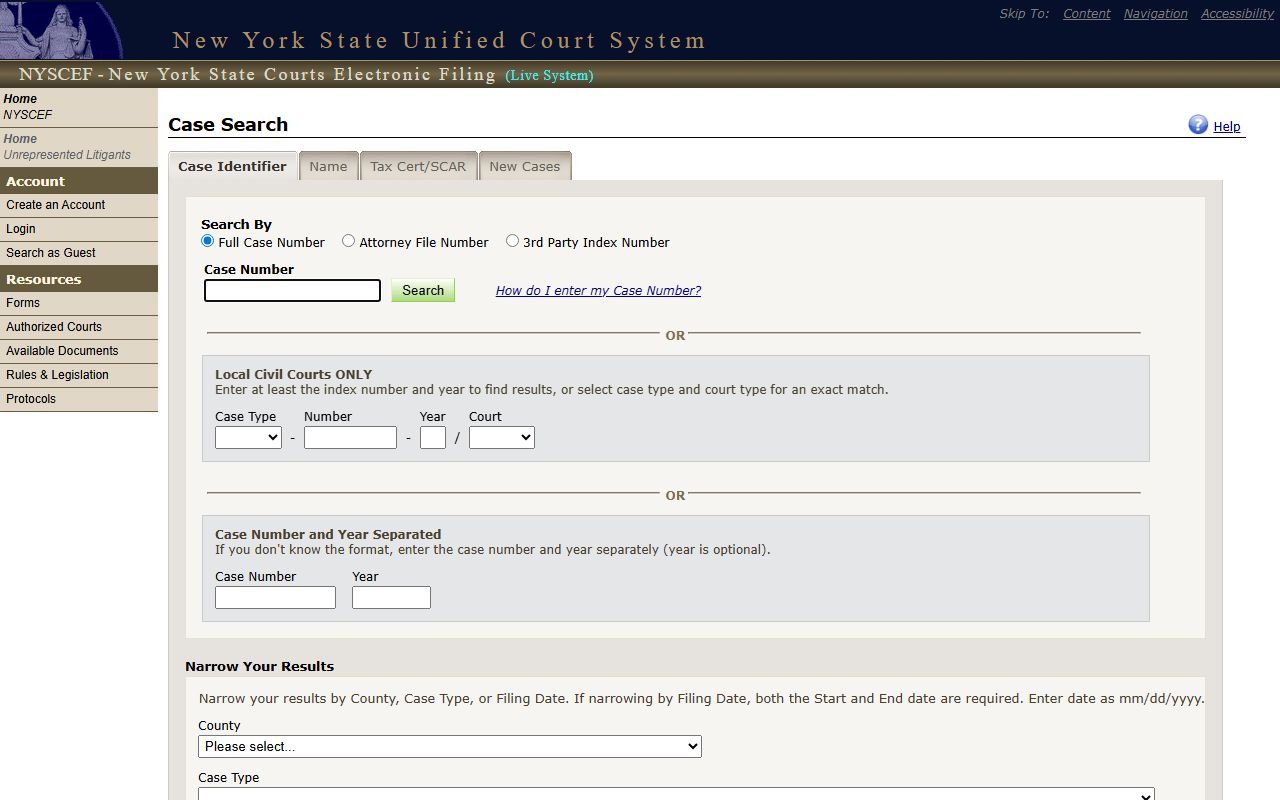
The form takes a full case number, an attorney file number, or a county and case-type pair. Nassau sits in the county list, which makes it easy to pull a county docket set by case type.
Reading a Nassau County Docket Entry
Each docket line carries a few standard parts. Once a reader knows what each part means, the whole calendar reads fast. The table below explains the common fields seen across the Nassau docket tools. These are the field types the portals use, not the contents of any one private case.
| Field | What It Shows |
|---|---|
| Entry Date | The day the court logged the filing, order, or appearance. |
| Event Type | The kind of action: motion, order, note of issue, plea, or appearance. |
| Party Filing | Which side filed the paper: plaintiff, petitioner, defendant, or the court. |
| Document Link | In NYSCEF, a link to the e-filed paper when the case is public. |
| Appearance Date | The next scheduled court date, conference, or calendar call. |
NYSCEF adds one big extra. When a case is e-filed and public, each docket line can link straight to the document. WebCivil and WebCriminal show the event but often not the paper itself. For those, the file copy comes from the clerk.
Courts That Publish Dockets in Nassau County
Not every Nassau court posts a docket online, and access depends on case type. Civil matters tend to be open. Criminal calendars are limited to selected courts. Family Court is closed to the public under Family Court Act § 166. Here is how the main courts handle online docket access.
- Supreme Court (civil) - Index, party, and calendar dockets in WebCivil Supreme; e-filed dockets in NYSCEF.
- County Court - Civil dockets in WebCivil; felony criminal calendars may appear in WebCriminal when a future date exists.
- District Court - Civil, small claims, and landlord-tenant dockets through WebCivil Local; criminal traffic and misdemeanor calendars in WebCriminal.
- Surrogate's Court - Estate and probate dockets through WebSurrogate. See the Surrogate's Court page.
- Family Court - No public docket. Access is limited to parties, attorneys, and court-authorized persons.
City courts in Long Beach and Glen Cove also appear in the WebCriminal court dropdown for covered criminal matters. Town and village justice courts handle local dockets that may not post online at all.
Docket vs. Full Case Record
The docket and the case file are not the same thing. The docket is the map. The file is the territory. A docket tells a reader that a motion was filed and decided. The full record holds the motion papers, the exhibits, and the signed order. The table below sets the two side by side.
| Docket | Full Case Record | |
|---|---|---|
| Format | List of dated entries | Full filed documents |
| Access | Often free online for public cases | May need a clerk visit, fee, or e-file access |
| Use | Track case progress and next date | Read the actual papers and orders |
| Source | WebCivil, NYSCEF, WebCriminal | NYSCEF documents or the Nassau County Clerk |
For most people checking a Nassau case, the docket answers the question. When a certified copy of an order or judgment is needed, that comes from the clerk who holds the file.
Nassau County Court Calendar Rules
A docket also drives the daily calendar. In Nassau District Court, the courthouse opens Monday through Friday, 9 a.m. to 5 p.m. Calendars are called at 9:30 a.m. All business must start by 4:30 p.m. These times shape when a case shows on the day's calendar and when a party must be in the room.
Adjournments change the docket. In District Court, an adjournment request must be in writing. The court will not take an adjournment by phone, and the other side must be told. A new date then posts to the docket. Note: a docket date can change after a written adjournment, so confirm the next appearance close to the date rather than relying on an old printout.
For Supreme Court civil matters, WebCivil lets a user filter for cases with future appearances and sort by court appearance date. That turns the docket tool into a quick calendar check for an upcoming Nassau conference or hearing.
Limits on Nassau Docket Access
Some Nassau dockets stay closed. Family Court dockets are not open under Family Court Act § 166. Matrimonial files are restricted under Domestic Relations Law § 235, so a divorce docket goes only to parties or the attorney of record. Sealed criminal cases under CPL § 160.50 drop off WebCriminal entirely.
The open-court baseline still holds for most civil matters. Judiciary Law § 4 makes court sittings public unless a statute or judge restricts them. So a public Nassau Supreme civil docket is the norm, and a closed one is the exception that a rule or order created.
Tracking a Nassau County Case Docket
Watching one docket over time beats checking it by hand each week. The Unified Court System runs eTrack, a free case-tracking service tied to the same data behind WebCivil. A user registers, adds a Nassau index number or case, and gets email alerts when a new docket entry posts or a court date is set. It works well for parties, witnesses, and anyone following a public Nassau Supreme or County Court civil matter.
NYSCEF adds its own tracking for e-filed cases. A registered filer sees a case activity list and gets notice of new filings. A guest can still pull the public docket at any time without a login, but alerts need an account. For criminal matters, the safest plan is to confirm the next date with the court clerk, since WebCriminal posts an open notice that updates can lag for a limited number of cases.
Three habits keep docket tracking clean. Save the index or case number the first time. Check the docket again the week of any date. Confirm a new date in the system after any adjournment. These steps catch most calendar changes before they become a missed appearance.